A beginner’s tour of the sneakiest Windows trick you’ve never heard of, and the open-source tool that catches it in the act.
Presented at Black Hat Arsenal, SecTor 2026, Toronto. Presented at Black Hat Arsenal, Europe 2026, London.
Every program on your computer is constantly asking Windows for help. Load me the graphics library. Load me the file-compression library. Windows dutifully goes looking, and here’s the punchline: it looks in a bunch of places, in a specific order, and it grabs the first file with the right name.
Not the right file. The first one with the right name.
You can probably see where this is going.
What’s actually happening
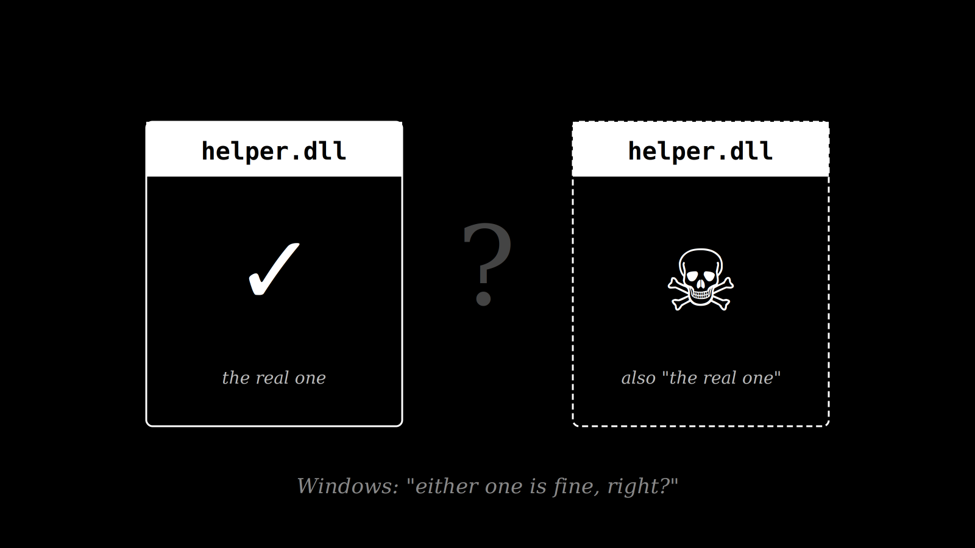
When a Windows program says load helper.dll, Windows checks something like six places for a file called helper.dll. It looks in the folder the program launched from, then System32, then a handful of other spots, in a fixed order. Whichever place it finds first is the one that gets loaded.
Usually the real one wins. But if an attacker can drop a file called helper.dll in a spot Windows checks earlier, say, a folder the program launched from that a normal user has permission to write to, then Windows will happily load that one instead.
The program has no idea. It just wanted helper.dll. It got helper.dll. Everyone’s happy. Except the attacker’s code is now running inside a trusted, signed application, sometimes as SYSTEM, the highest privilege on the machine.
This is DLL hijacking. It’s been around approximately forever. And it’s how a genuinely surprising amount of real-world malware persists on machines, sneaks past antivirus, and quietly escalates from “user who clicked a bad link” to “administrator on your domain controller.”
The trouble with “might”
There are tools that scan for this. Spartacus is a great one. Crassus, too. They walk through your system, look at every program’s list of DLL dependencies, and produce a catalogue of candidates: files that could theoretically be hijacked.
The problem: that list is often thousands of entries long, and most of them aren’t real. A theoretical hijack isn’t the same as a working one. Windows has ways to block many of them silently. Certain DLLs are cached in a way the search order can’t touch, certain paths are protected, certain programs opt into a stricter search order that ignores the risky spots. None of that shows up in a pure static scan.
So you’re left with a list of maybes. And at that point, you’re not doing security work anymore. You’re doing homework.
A theoretical hijack isn’t the same as a working one. What you actually want is a receipt.
Canary Confirmation
DLLHijackHunter does something the others don’t. When it finds a candidate, it deploys a small, harmless DLL, the canary, into the exact spot where the hijack would occur, triggers the vulnerable program, and waits.
If the canary loads, its first act is to write a confirmation file: process name, user context, integrity level, full privilege token. Then the tool cleans up, restores whatever was there before, and moves on to the next candidate.
That file is the receipt. It’s the difference between “this looks like it might work” and “we watched it work.”
One complication worth knowing about: some programs crash on startup if the DLL they load doesn’t export the right functions. For those cases, the tool works in proxy mode. Instead of dropping a bare canary, it synthesises a wrapper DLL that forwards every export call through to the original which it renames and keeps beside it while still firing the canary payload on first load. The synthesis happens entirely in memory, assembling a valid Windows PE at runtime. No compiler. No build toolchain. The target program keeps running normally. The canary still confirms.
How DLLHijackHunter actually works
Under the hood, DLLHijackHunter runs a five-phase pipeline. Each phase’s job is to be sceptical of the previous one. Findings have to survive every stage to make it into the final report.
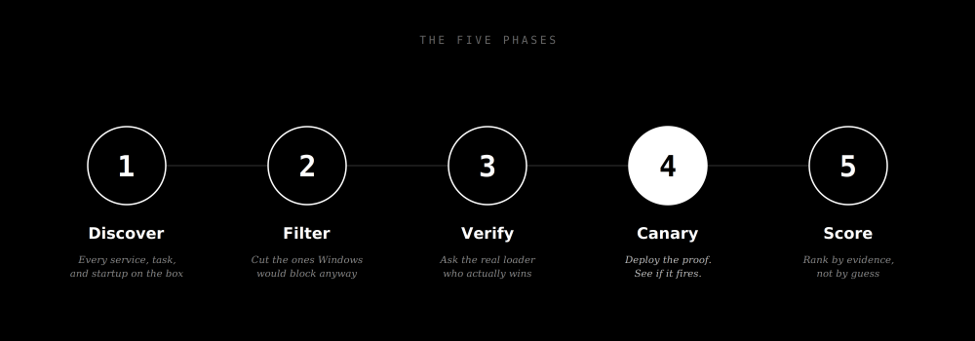
- Discover is the boring part. The tool opens every Windows service, scheduled task, startup entry, and COM object, then reads their internals to figure out which DLLs they load. Boring, but thorough. Several thousand items on a typical machine.
- Filter is where most candidates die. Windows won’t actually let you hijack API set stubs, or DLLs in the KnownDLLs cache, or paths you as an attacker cannot write to. The filter removes those cleanly. What survives is worth investigating.
- Verify is optional but powerful. The tool asks the real Windows loader, in a separate, isolated process, to resolve the DLL name and report which file it would load. If a protected copy in System32 wins, the “candidate” was a false alarm and gets flagged as such.
- Canary is the star of the show, and the reason this tool exists. Everything above is discovery. This is proof.
- Score keeps the tool honest. Canary-confirmed findings sit at the top, marked Confirmed. Findings backed by documented public vulnerabilities are marked High. Everything that’s only a static match, with no canary, no runtime observation, and no known reference, is deliberately capped below High, because without proof it hasn’t earned that label.
A real example from HijackRange
To keep ourselves honest, we built a benchmark called HijackRange: a set of scenarios with known-correct answers, so we can measure whether the tool is telling the truth. One of those scenarios is a Windows service called HijackRangeAlpha that runs as NT AUTHORITY\\SYSTEM and loads a helper DLL called alpha_payload.dll. The directory it loads from is writable by any unprivileged user. This is the exact shape of a misconfiguration you would find on a real engagement.
We pointed DLLHijackHunter at it. This is roughly what happened.
Discovery said: there is a service running as SYSTEM that loads alpha_payload.dll. The filter said: the directory is writable by a standard user, this is a real candidate. The canary phase synthesised a benign DLL from an embedded precompiled binary, deployed it to the writable path, restarted the service, and waited. A few seconds later, a file appeared on disk.
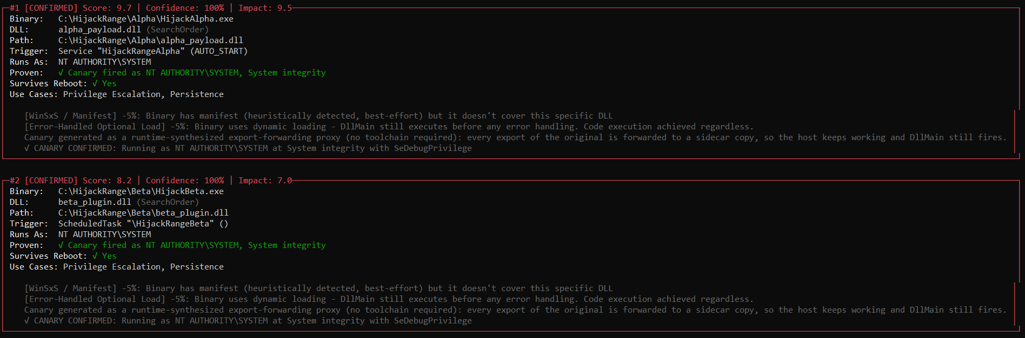
That is not analysis. That is Windows writing a confession.
Before the canary ran, this finding sat in a list of medium-confidence candidates alongside dozens of others. Every other tool in this space would have stopped there, “possibly hijackable, go verify it yourself.” With the canary, it stopped being a hypothesis. It moved to the top of the report as Confirmed, running as SYSTEM with a full privileged token. There was nothing left to argue about.
Try DLLHijackHunter yourself
DLLHijackHunter is on GitHub, MIT-licensed, and ships as a single .NET 8 executable. No dependencies to install, no build toolchain required.
A safe first run. Pure static discovery, no canary, no triggering of anything on your machine:
DLLHijackHunter.exe --profile safeA more aggressive run with canary confirmation enabled:
DLLHijackHunter.exe --profile aggressiveOnly show the findings the canary actually proved:
DLLHijackHunter.exe --profile aggressive --confirmed-onlyTarget one specific program instead of the whole machine:
DLLHijackHunter.exe --target "C:\Program Files\SomeApp\some.exe"
Documentation: DLLHijackHunter · ProjectMerai
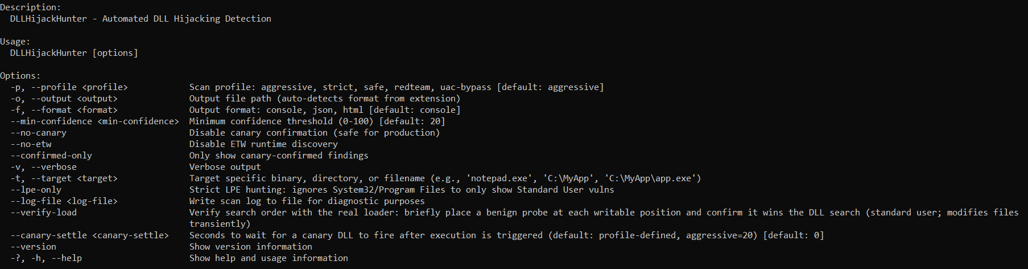
A word of caution. Canary confirmation is not a passive scan. To prove a hijack works, the tool briefly restarts services, drops files into system directories, and triggers scheduled tasks. It cleans up carefully after itself, but on a production machine “carefully” is not the vibe. Run it in a VM or on a lab box the first few times. Use –profile safe or –no-canary when you just want a quiet static look.
The bigger point
There is a fashion in security tooling to produce very long lists of “potential” issues and call it a day. That works fine if your job is to look busy. It works badly if your job is to actually fix things, because a long list of maybes is indistinguishable from a long list of noise, and the real bugs get lost in it.
DLLHijackHunter is a small, opinionated argument for the other direction: show fewer findings, but stand behind each one. When it says a hijack works, it’s because it just watched it work. When it says a candidate is suspicious but unproven, it says so plainly and doesn’t oversell it.
The industry standard for a DLL hijack finding is a paragraph of reasoning. Ours is a text file that Windows wrote for us. We think that’s a better standard.
DLLHijackHunter is built and maintained by ProjectMerai.
Source code, documentation, and issue tracker on GitHub: https://github.com/projectmerai/DLLHijackHunter
MIT licensed. Contributions welcome.
Being presented at Black Hat Arsenal, SecTor 2026 in Toronto, October 7 to 8 and Black Hat Arsenal, Europe 2026 in London, 7-10 December. If you’re at the conference, come say hi. We’ll be running live demos and we’re always looking for interesting scenarios to add to the benchmark.