Secure client access policies with Versa MCP configuration tool

See how Versa's MCP Server connects LLM agents to live SASE configurations, enabling real-time policy queries, duplicate detection, and AI-driven validation.

Arun Chandar
Lead Solution Architect
  • Read Time: 6 min
  • Published: April 8, 2025
  • Modified: May 26, 2026
  • 6 min read
  • April 8, 2025
  • May 26, 2026

Summary

LLM-powered secure access policy automation, driven by the Versa MCP configuration tool, enables NetOps and SecOps teams to build, audit, and optimize Secure Access Client rules directly from AI assistants like Claude Desktop. Centralizing policy visibility and applying intelligent analysis eliminates fragmented workflows, reduces manual overhead, and strengthens security posture with greater speed and confidence.

  • The Versa MCP Server connects the Versa Unified SASE platform with agentic AI tools including Claude, ChatGPT, Gemini, and Microsoft Copilot.
  • LLM-powered analysis detects duplicate or conflicting SAC rules, preventing policy sprawl and identifying misconfigurations such as failed device posture checks.
  • Engineers can create, verify, and delete Secure Access Client rules through natural-language prompts without switching between dashboards or consoles.
  • AI-driven validation aligns SAC policies with enterprise security standards by querying user-level mappings, OS compatibility, and device posture requirements.
  • Real-time API integration enables dynamic access to current configurations, delivering faster incident resolution and significantly less manual policy management effort.

This blog examines how applying LLM-powered automation to policy management helps security and networking teams build, audit, and optimize network policies more efficiently, using an example from the Versa MCP Server.

Such automation integrates into existing workflows, offering real-time access to current configurations and intelligent policy insights – all without requiring teams to switch tools.

From MCP Server to SAC policy intelligence

During RSA 2025, we announced the Versa MCP Server, which connects the Versa Unified SASE platform with leading Agentic AI tools such as Claude, ChatGPT, Gemini, and Microsoft Copilot.

By securely exposing Versa APIs – an integration that can also be leveraged with on-prem LLMs – the MCP Server enables LLM-powered agents to query Versa deployments in real time, providing dynamic access to network and security data. For NetOps and SecOps teams, this means faster incident resolution, greater visibility into configurations and outcomes, and significantly less manual overhead.

Building on the foundation of the MCP server, below I cover how it can be used to access, configure, and enforce secure access client policies more intelligently and effectively.

The MCP server tackles a persistent operational challenge: fragmented policy management spread across dashboards, consoles, and chat interfaces. By centralizing policy visibility and applying LLM-powered analysis, it enables engineers to build, validate, and refine rules with greater speed and confidence.

Key capabilities for managing Secure Access Client (SAC) rules include:

  • Detect duplicate or conflicting SAC rules to prevent policy sprawl.
  • Identifying misconfigurations, including failed device posture checks and security risks, using LLM-powered insights
  • Querying SAC rule configurations for user-level mappings, device posture checks, and operating system compatibility requirements.
  • Align policies with enterprise security standards using AI-driven validation.

Walkthrough

Let’s walk through a real-world scenario where the MCP Configuration Tool is used to create and delete a SAC rule. For this example, we will use Claude Desktop to interact with the MCP Server.

Step 1: Set up the Versa MCP server

We begin by cloning the MCP server repository and following the setup instructions in the README.md.

Once installed, check or modify the claude_desktop_config.json file for Claude Desktop to ensure it includes the necessary Versa MCP servers/tools. A sample is shown below:
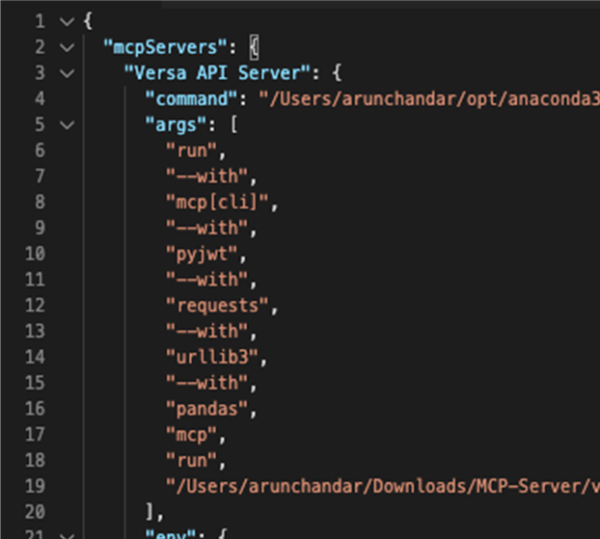
Code snippet showing MCP API Server configuration file

Note:

  • Modify the command field to match the Python location on your system. The example uses Python with uv.
  • Modify the run field to point to the correct .py file for the MCP server/tool on your local system (for STDIO mode) or follow the setup for SSE mode.
  • Replace the following environment variables with values from your infrastructure
    • DIRECTOR_URL
    • VN_USERNAME
    • VN_PASSWORD
    • VN_CLIENT_SECRET (generate this from the Director)
    • VN_CLIENT_ID (generate this from the Director)

Once complete, proceed to Step 2.

Step 2: Verify Claude is connected to Versa MCP tools

Next, launch Claude Desktop and confirm that it successfully connects to the MCP Server. Upon startup, the configuration panel displays all active integrations – including the Versa API Server if the connection is established.
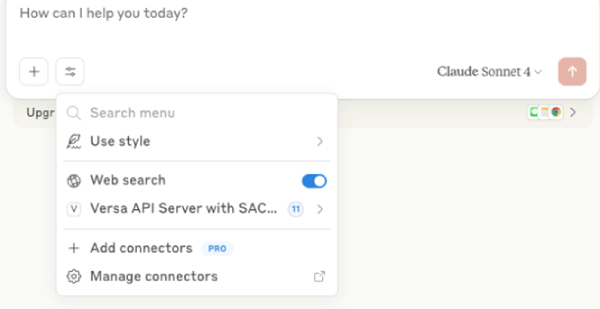
AI assistant interface showing Versa API server with SAC menu

From this panel, available tools can be reviewed and toggled on or off as needed.
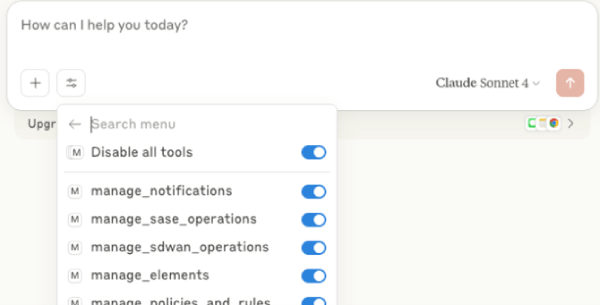
AI assistant interface listing MCP tool operations toggles

Step 3: Create a SAC rule for a specific user

Next, we use Claude Desktop to define a new Secure Access Client (SAC) rule. In this case, the goal is to create a policy that applies specifically to Windows 10 devices used by a specific user.
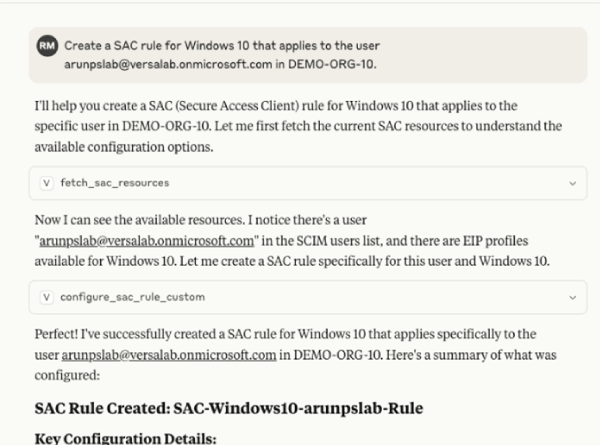
AI assistant output creating Secure Access Client rule for Windows 10

Step 4: Verify the rule in Versa Concerto

To confirm the rule was applied correctly, log into Versa Concerto and navigate to the SAC policy configuration page. There, we verify that the new rule – scoped to Windows 10 and the specific user – appears in the active policy list.

Table showing SAC rule details including OS and endpoint posture

Step 5: Delete the SAC rule

To remove the previously created SAC rule, we issue a prompt in Claude Desktop requesting its deletion.
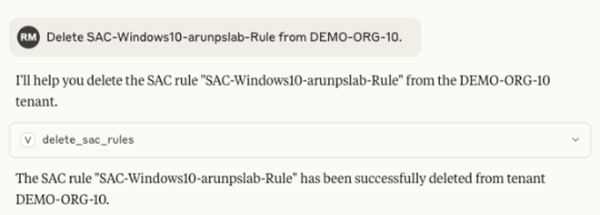
AI assistant output deleting the SAC-Windows10 rule

Final thoughts

This example illustrates how the MCP server simplifies and strengthens secure access policy management by combining real-time data with LLM-powered insights.

It allows teams to build cleaner, more secure policies – faster and with significantly less manual effort. For a full walkthrough of the tool in action, including a complete scenario demonstrated here, check out the demo video here.

Learn more about SASE use cases for MCP servers here.

Arun Chandar

By Arun Chandar

Lead Solution Architect

Arun Chandar designs SD-WAN and SASE deployments for complex enterprise environments and works on bringing AI-powered automation into network and security policy management. Before joining Versa, he held engineering roles at Tata Communications covering network, security, SD-WAN, and cloud services. His writing focuses on how security and networking teams can build, audit, and optimize policies more efficiently using agentic AI tools.

FAQs

The Versa MCP Server is a utility that connects the Versa Unified SASE platform with leading Agentic AI tools such as Claude, ChatGPT, Gemini, and Microsoft Copilot. By securely exposing Versa APIs, the MCP Server enables LLM-powered agents to query Versa deployments in real time, providing dynamic access to network and security configuration data.

Traditional policy management fragments workflows across multiple dashboards, consoles, and chat interfaces, increasing manual overhead and error risk. An MCP configuration tool centralizes policy visibility and applies LLM-powered analysis, enabling engineers to build, validate, and refine secure access rules with greater speed, confidence, and consistency than manual approaches allow.

LLM-powered agents query Versa deployments through the MCP Server to analyze Secure Access Client rule configurations in real time. These agents identify duplicate or conflicting rules, detect failed device posture checks, flag security risks, and validate user-level mappings and operating system compatibility requirements – surfacing misconfigurations that would otherwise require time-intensive manual audits.

Secure access policy automation reduces manual overhead for NetOps and SecOps teams, accelerates incident resolution, and increases visibility into configurations and policy outcomes. By enabling AI-driven validation against enterprise security standards, teams build cleaner and more secure policies faster, minimizing policy sprawl and reducing the risk of misconfigurations across the environment.

Deploying the Versa MCP Server requires cloning the MCP server repository, configuring environment variables including Director URL, credentials, and client ID and secret generated from the Versa Director. Teams must also configure their chosen AI client – such as Claude Desktop – to point to the correct MCP server files and verify active tool connections before use.

Subscribe to the Versa Blog

This site is protected by reCAPTCHA and the Google Privacy Policy and Terms of Service apply.

Related Posts