One of my favorite things about Versa technology has always been its programmability. Utilizing APIs, we can automate and orchestrate SASE services to simplify our lives as network or security engineers.
With the unveiling last month of our new MCP server we elevate that programmability by integrating large language models (LLMs) like ChatGPT and Claude.
Sounds good, right? But what does that mean for the regular IT engineer? And more importantly, what are the tangible use cases for this sort of technology?
In this article, we’ll briefly explain how the Model Context Protocol (MCP) works, describe the functionalities of an MCP server, explore the Versa MCP Server integration with Claude Desktop, and examine three real-world scenarios where this technology can simplify and supercharge enterprise network and security operations.
What is MCP?
Anthropic’s analogy for MCP is that it’s like a USB-C port for AI applications:
“Just as USB provides a standardized way to connect your devices to various peripherals and accessories, MCP provides a standardized way to connect AI models to different data sources and tools.”
MCP operates by allowing AI tools – in this context referred to as MCP clients – to access data from different applications, as shown in Figure 1. Within this framework, the MCP server acts as an exchange layer between your LLM and other applications.
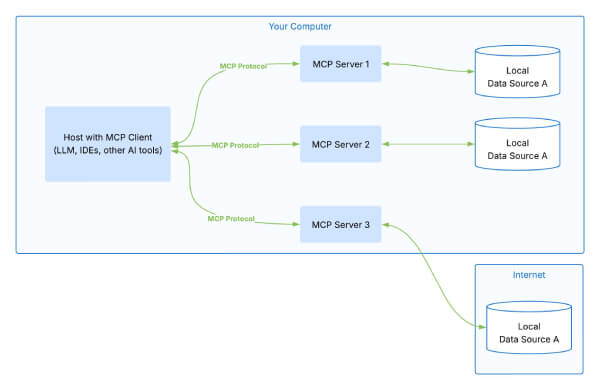
Building on the USB analogy, if MCP is the protocol that enables communication, the MCP server is like a cable that connects two services: an application and an LLM.
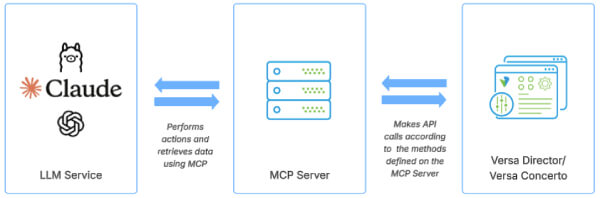
Through an MCP server, an LLM can access an app to perform basic troubleshooting, generate actions, validate configurations, and make decisions intelligently and automatically. In the context of Versa technology, it acts as a broker between your AI and Versa Director, our virtualization and service creation platform, allowing it to dynamically query elements on your network without directly exposing the information to the model.
Compared to other integration methods, MCP’s open standard lets you connect a third-party application to multiple LLMs – like ChatGPT, Claude, or Ollama – simply by updating configuration settings instead of rewriting code. At the same time, the MCP Servers enforces application boundaries: the AI agent can only invoke the specific endpoints the server exposes.
This ensures all operations remain within preapproved boundaries and prevents any direct access to your infrastructure.
Sample architecture and deployment steps
- LLM → MCP Server: The model consumes human-language instructions. It then uses MCP to translate those instructions to specific actions.
- MCP Server → Versa Director: MCP performs those actions using predefined API calls – either read or (where permitted) write operations.
- Pre-approved actions: Versa MCP Server only exposes a whitelisted set of endpoints so the AI can’t access unintended resources.
Disclaimers
Before we explore the use cases, please note that this article is not an endorsement of any AI model or specific LLM technology. We’re using Claude for Desktop simply because it is the one we happen to be working with at this very moment.
You should evaluate the pros and cons of any LLM solution, including privacy, security, and cost considerations. Furthermore, you must ensure its use is authorized by your organization.
Also, none of the examples below work out-of-the-box – each demo combines multiple prompt-engineering and customization techniques. Remember that the MCP server itself contains no built-in logic; it merely enables LLMs to interact securely with our Versa infrastructure.
Finally, this is not a step-by-step guide on how to deploy an MCP server into your SASE network. It is merely an exploration of some of the practical use cases for this technology.
If you are eager to deploy it on your setup, we recommend visiting the repository for our MCP server and reaching out to your Versa representative in case you need further assistance.
Use case no. 1: Automate tedious tasks in a much simpler way than APIs
To speed things up, engineers who work with Versa technologies utilize APIs to interact with our technology and build scripts that perform those tasks in an automated way.
Simplifying automation with natural language
With an MCP server, IT professionals have a new tool to automate tasks that would take a lot of effort for a human to accomplish. Instead of building a Python script to make API calls to Versa Director and then scrape the data, an engineer can just pose a question to their LLM of choice.
The LLM will get the data through the MCP server and then process it accordingly.
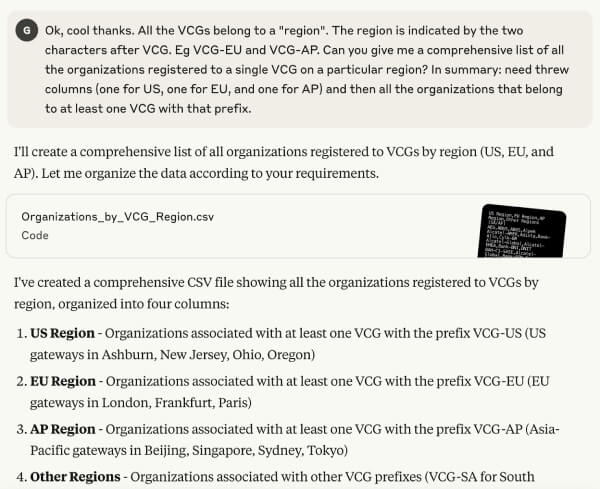
Imagine you are a Managed Service Provider that has customers deployed in different SASE gateways. Your boss asks you to present them with a list of customers per region.
Instead of spending time retrieving the data from your SASE portal, you can simply ask your LLM the question. The AI will then know exactly which API calls are required to gather the information.
An additional benefit of using this technique is that you can ask the AI model to present the output in any way you want – which means you get to spend more time deriving valuable insights from the data, instead of spending it gathering the information.
Here below is an example of how this is achieved on Claude Desktop.
Use case no. 2: Act as a troubleshooting assistant to NOC or SOC engineers
Engineers must quickly learn new platforms, architectures, and the specifics of each customer environment. Even with thorough deployment guides, new hires still need time to absorb it all.
Working in a network operations center (NOC), I’ve often wished I could clone a colleague whose deep understanding of a project or technology feels irreplaceable.
Capturing expert knowledge with prompt engineering
The good news is that, with AI, we can capture an expert’s knowledge and use it in real time to debug a network. We can achieve this by leveraging a technique called prompt engineering.
Prompt engineering works by providing the LLM with context, instructions, or examples of what to do in certain scenarios. A senior engineer might create a troubleshooting guide that lists common commands and outlines the network’s topology, so the AI model has the necessary context.
Prompts can also include guardrails or special notes. For example, “avoid suggesting a topology change” or “remember the network uses a full-mesh topology.”
Applying knowledge in real time
In order to leverage this knowledge, a user can simply submit this document at the beginning of a new chat. The AI model will use it to suggest possible troubleshooting steps and act as an assistant to the engineer performing the task, applying in real time all the knowledge from the existing documentation.
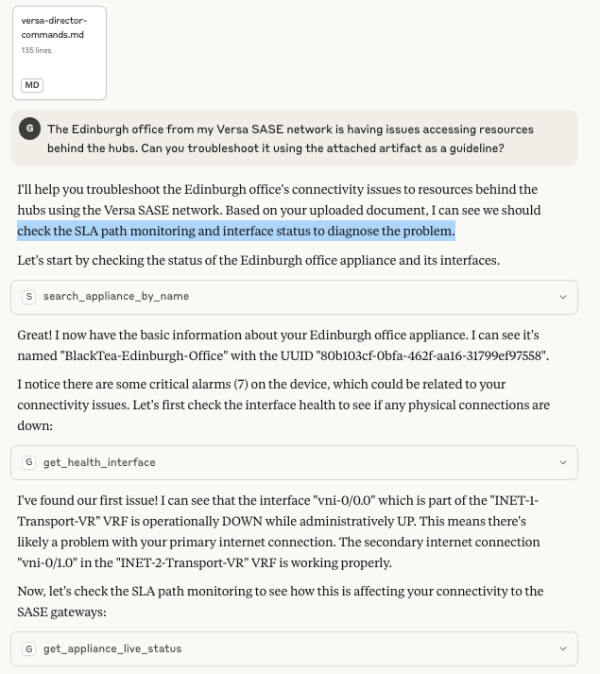
In Figure 4, Claude performs a series of troubleshooting steps using the guidelines that we passed in the Versa Director commandsmd file attached in the beginning of the chat.
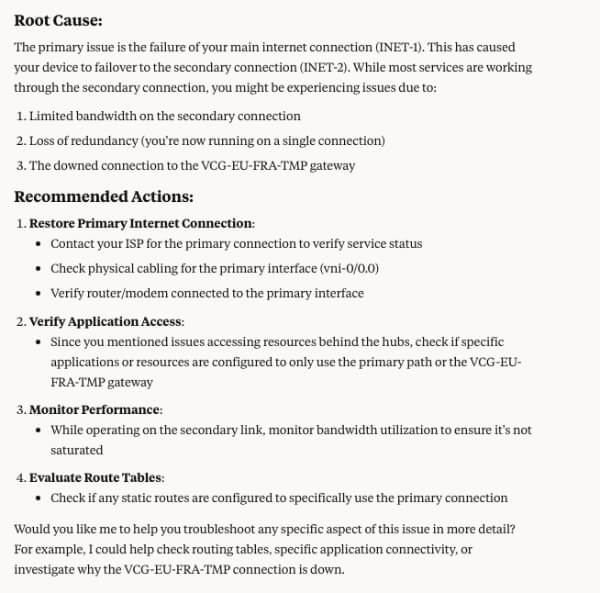
In Figure 5, after the troubleshooting process Claude provides a possible Root Cause Analysis RCA and some recommended actions. Remember to always verify AI results – they can make mistakes! To unlock even greater value, you can develop a bespoke model by creating a custom GPT. Such a model would be fine-tuned to your own runbooks, operational procedures, and historical incidents. This dedicated assistant will surface context-aware recommendations tailored to your network’s architecture and team’s workflows.
Use case no. 3: Perform security policy audits and checks
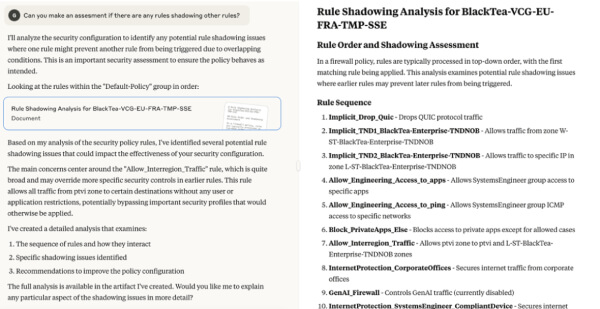
For this use case, prompt engineering also brings a lot of value. We can use it to give the model our audit requirements to identify rule conflicts, spot unused entries, and highlight overly permissive access.
Creating custom MCP methods
We can also create custom methods for the Versa MCP Server. Although our Versa engineering team has provided ready-to-go functions for core operations, customization is often necessary to cover specific use cases.
Since Versa’s MCP is open source, you can add your own methods to fill any gaps. Just check your organization’s AI usage policies and security guidelines before doing so and include detailed comments in new methods so the AI knows when and how to invoke them.
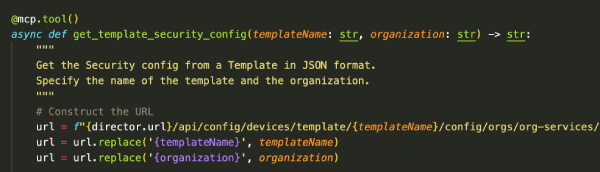
Once configured, the AI model can produce a thorough, professional-quality audit report in seconds. This will save you countless hours while ensuring your security posture stays airtight.
Conclusion
If you’d like to explore how Versa MCP Server can transform your organization’s network and security workflows, contact the Versa team to start the conversation.
Learn more about configuring secure client access policies using Versa’s MCP Configuration Tool here.

Gerardo Melesio works with network and security teams to design and automate SASE deployments, with a particular focus on the programmability of the Versa platform through its APIs and its MCP Server integration with large language models. Earlier in his career he worked with satellite operator SES Networks, experience that informs his work on securing SD-WAN networks in (DDIL) environments.