Ever wonder why it seems to take so long to resolve user experience and performance issues? While it may be frustrating for end users to struggle through a choppy video call or sit through a slow-loading Salesforce page, it can just be as hair-pulling for IT.
In today’s business landscape, the distributed workforce is the norm. Employees are spread across global locations in branch offices, home offices, and the local café.
While work-from-anywhere flexibility boosts productivity and employee satisfaction, it presents significant challenges for IT teams. Chief among these is the difficulty in diagnosing and resolving performance issues when IT can’t directly see what’s happening on an end user’s device or network.
Add to the mix SaaS and internet apps, and it is soon apparent why helpdesks struggle with figuring out why a user cannot access a file in their OneDrive account.
When employees reach out to IT about slow applications, unreliable connections, or other performance problems, the support team has limited visibility into the employee’s device, home network or internet connection. This leads to a lengthy “try this” troubleshooting process, taking up both IT and the end user’s time.
Often, the ticket is passed between different departments without a clear resolution. The result is wasted time, frustrated users, and strained IT resources.
Why Versa Digital Experience Monitoring (DEM) is a gamechanger
This is where Versa’s Digital Experience Monitoring (DEM) solution makes a critical difference. Versa DEM provides IT teams with unparalleled visibility across devices, networks, and applications, regardless of where users are located.
It allows IT to see and analyze performance metrics for each network segment (shown below), enabling them to pinpoint issues quickly and accurately.

With Versa DEM, IT administrators can swiftly narrow down whether the root cause of an issue lies within the company’s control, such as a network misconfiguration, or if it’s due to external factors like an employee’s local internet connection or an application’s server. This precision accelerates problem resolution and enhances the user experience (for both their work-from-anywhere experience as well as interactions with IT).
Moreover, Versa DEM can empower employees to take steps to improve their own experience. For example, if a weak Wi-Fi signal is identified, IT support can suggest that a user move closer to the access point or switch to their mobile 5G network.
Let’s look at an example.
Versa DEM in action
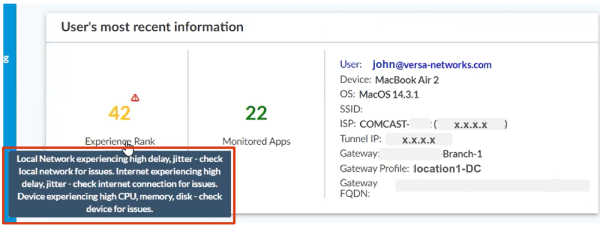
Let’s say a user, “John,” calls the IT helpdesk saying he can’t get to his Dropbox. As a Versa DEM administrator, we can search for and pull up John’s user experience page.
We can immediately see John’s “Experience Rank” (colored yellow since he has a degraded experience) relative to other users, as well as any performance issues that may be relevant, shown in the boxed text below.
Identifying problem areas in the network topology
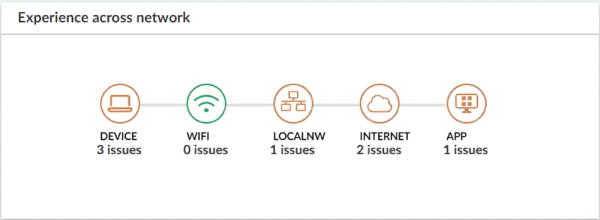
A topology of John’s experience across the network also highlights where problem areas could be. In this case, he appears to have issues with his MacBook Air, connection to the local network, connection to the internet, and the app. At least he isn’t having any Wi-Fi problems!
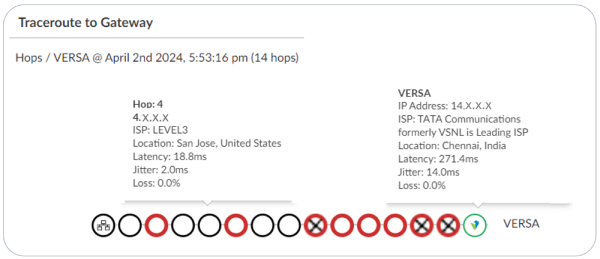
For even more insight, looking at the traceroute shows exactly how much latency, jitter, and loss occurs at each hop.
Each user’s page is also complete with graphical details of various performance metrics over time. The example below shows John’s local network loss and internet loss over time.
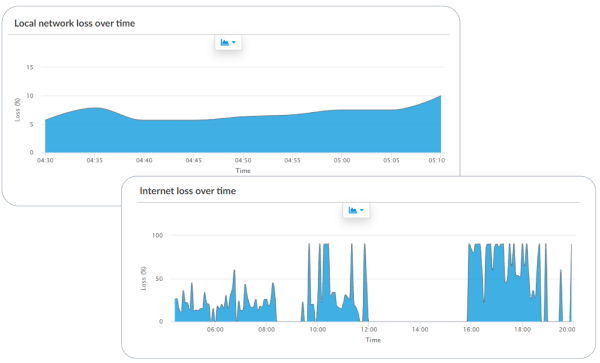
This alleviates the need to replicate the problem when the user calls in – we can just check the user experience for the period needed. We can also see if there are patterns to when poor user experience occurs.
Drilling down to application-level experience
Going back to John and his complaint about Dropbox access, we can switch to the “Applications” view to see his user experience for each app. We see he has a degraded experience for Dropbox (highlighted below).
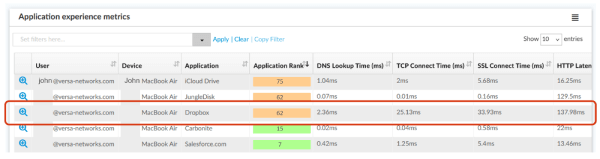
Now, remember that we saw John had several potential issues that could prevent his access to Dropbox (device, local network, internet, and app). How can we pinpoint the exact cause?
First, we can look at the application experience specific to Dropbox across his network. In his case, it looks like performance is fine until we reach the Dropbox server.
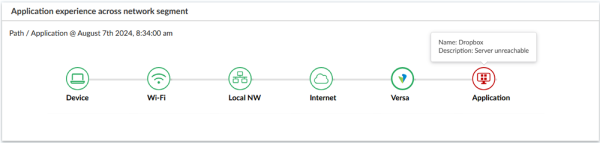
Confirming the root cause
This points to an application server issue, but let’s double-check. If it’s a server issue, it shouldn’t just be John having a problem with access.
By switching to the application server map view (below), we see that there are many people connecting to the same Dropbox server with degraded experience.
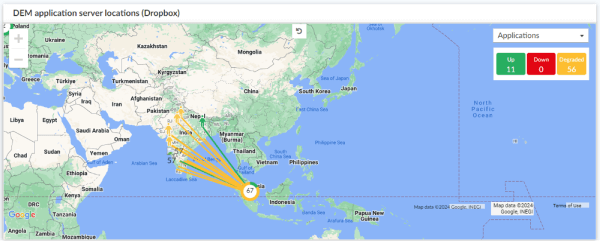
This confirms that John’s issue with Dropbox stems from the application server itself.
While in this case, John’s IT team can’t do anything about Dropbox’s server, they can manage John’s expectations and file a ticket with Dropbox on his behalf. In addition, the IT team can now proactively notify other users trying to connect to Dropbox that the server is currently unreachable and suggest a workaround. This could prevent other calls or tickets like John’s from inundating the IT team.
Ultimately, as we saw in John’s case, Versa DEM helps businesses operate more efficiently by minimizing the time and resources spent on troubleshooting, reducing operational costs, and improving overall employee satisfaction. By implementing Versa DEM, organizations can ensure they are providing exceptional user experiences and maintaining high levels of productivity.
To learn more about how DEM can benefit your organization, check out the resources on our Versa DEM page or contact your account representative for a demo.

Rahul Vaidya is an industry veteran with over two decades as a product leader and currently oversees product strategy in areas including Digital Experience Monitoring, CASB, and the patented SASE-on-SIM approach to agentless Zero Trust. He came to Versa following prior roles at Cisco, Juniper, and Samsung Electronics, and has a master's in engineering from the Indian Institute of Science, Bangalore.